 Costitecture
Building and renovation
Take control of your project’s budget
Building it yourself, renovating or having a home built? Expenses, invoices, quotes, purchases and payments: keep track of your project at a glance, alone or with your partner, from the first invoice to the end of the work.
- No sign-up
- Secure data
- iPhone, iPad and Android
- Free version available
New: for self-builders
Designed for people who build it themselves
Do you buy your own materials, do part of the work yourself and leave the rest to contractors? Six features track your project as it really is.
Materials or labour
Each expense is classed as materials, labour or other. See at a glance what your supplies cost and what your contractors cost.
Who does each stage
Myself, a contractor or both: record who does the work on each stage, and see it at a glance in the list.
Credit notes, returns and refunds
Returned an item to the store? Record the credit note: its amount is deducted from what you’ve spent, from the stage and from the supplier. Invoice reading recognises credit notes.
Spending by supplier
How much you’ve spent at each store and with each contractor, and over how many purchases: useful for negotiating a discount or choosing where to buy.
Your real savings
For a stage you do yourself, compare your actual spending with a contractor’s quote for the same work. Provisional savings while the stage is under way, final savings once it’s finished. No quote, no estimate.
Shopping list and price comparison
To buy, ordered, received: note several prices for each item, with the product reference, link and delivery cost. The cheapest stands out, and one tap turns it into an expense.
In England, 64,851 people were on the self-build and custom housebuilding (“Right to Build”) registers on 30 October 2024. (GOV.UK, self-build and custom housebuilding data)
Better than a spreadsheet: it all fits in your pocket, invoices included.
Your whole project
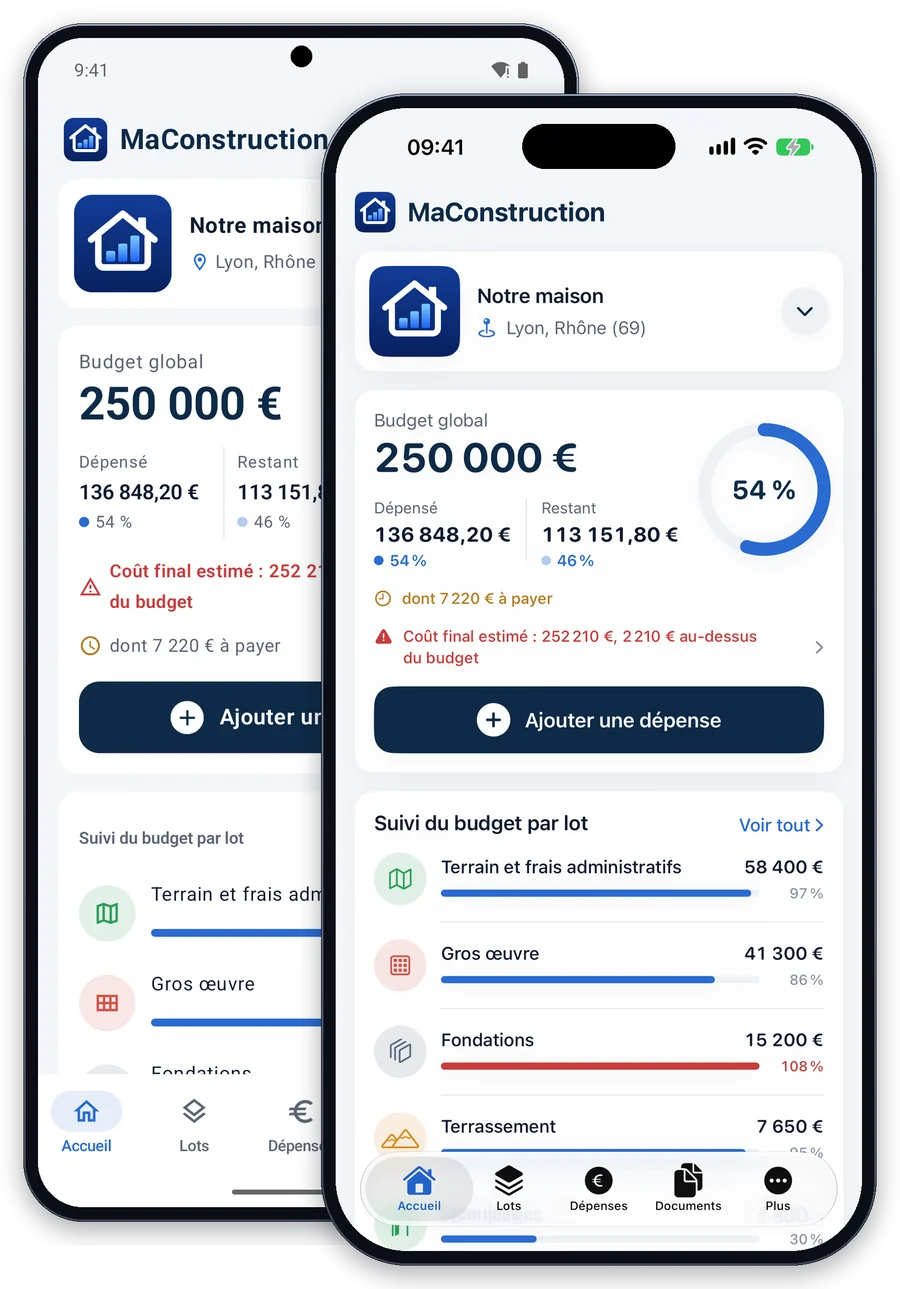
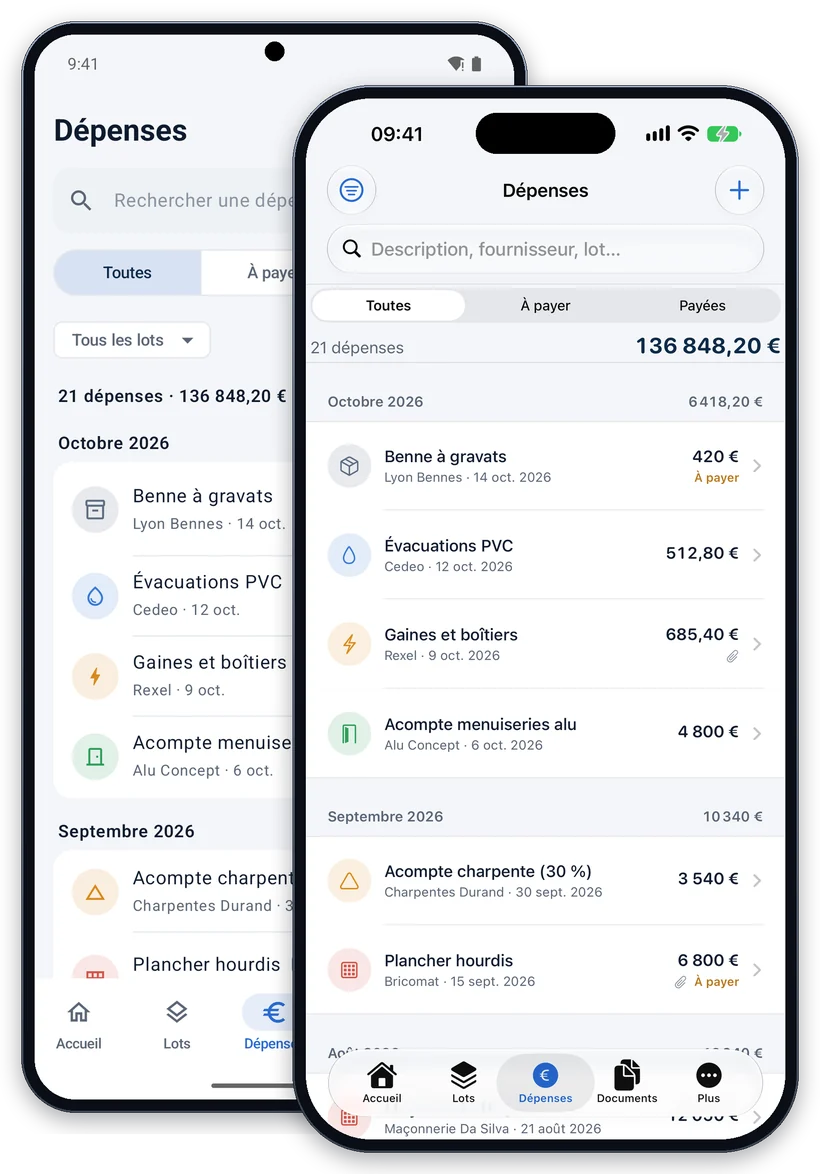
One app, your whole budget
Designed for people who are building or renovating: simple day to day, thorough when you need it.
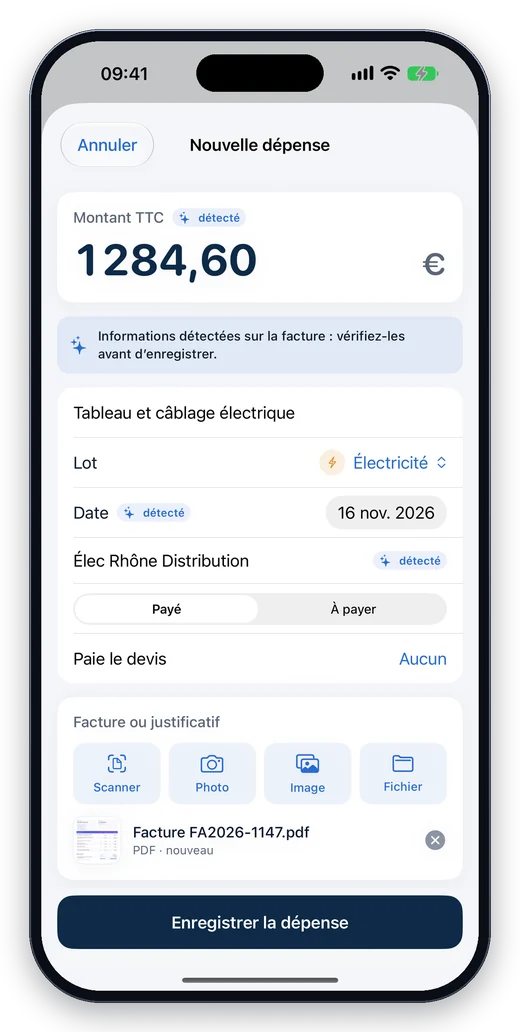
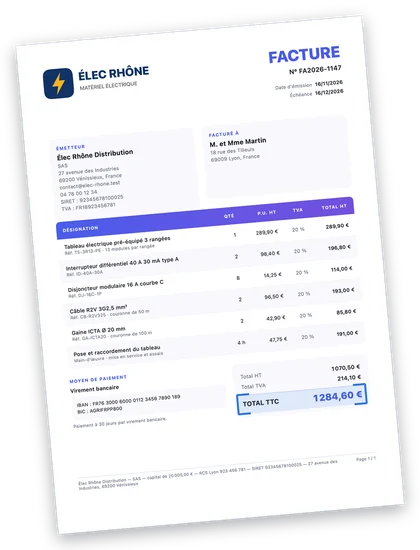
Scan your invoices in seconds
Take a photo of an invoice or scan it: the amount, date and supplier fill themselves in. You check, you save.
- Invoices, quotes and photos all in one place
- 5 free readings, unlimited with Plus
- Reading happens on your phone
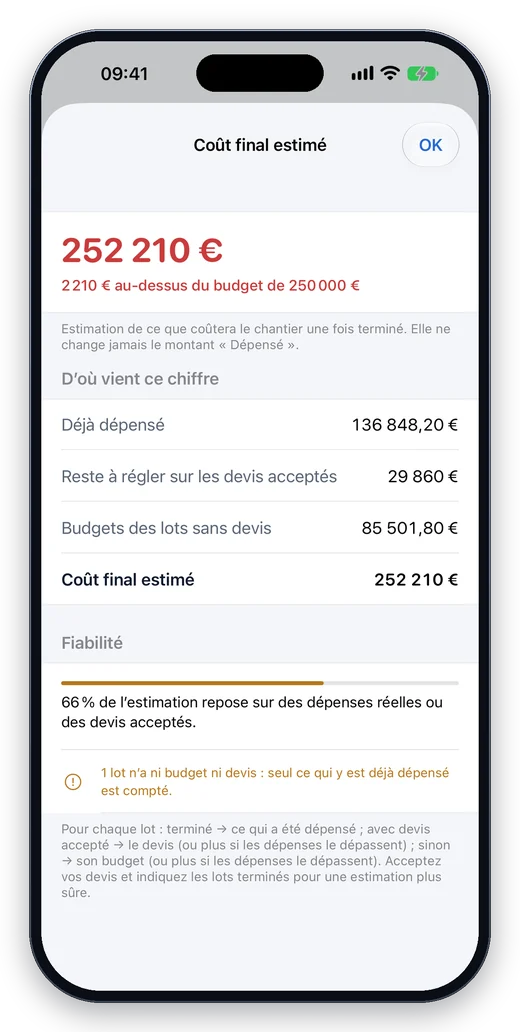
See budget overruns coming
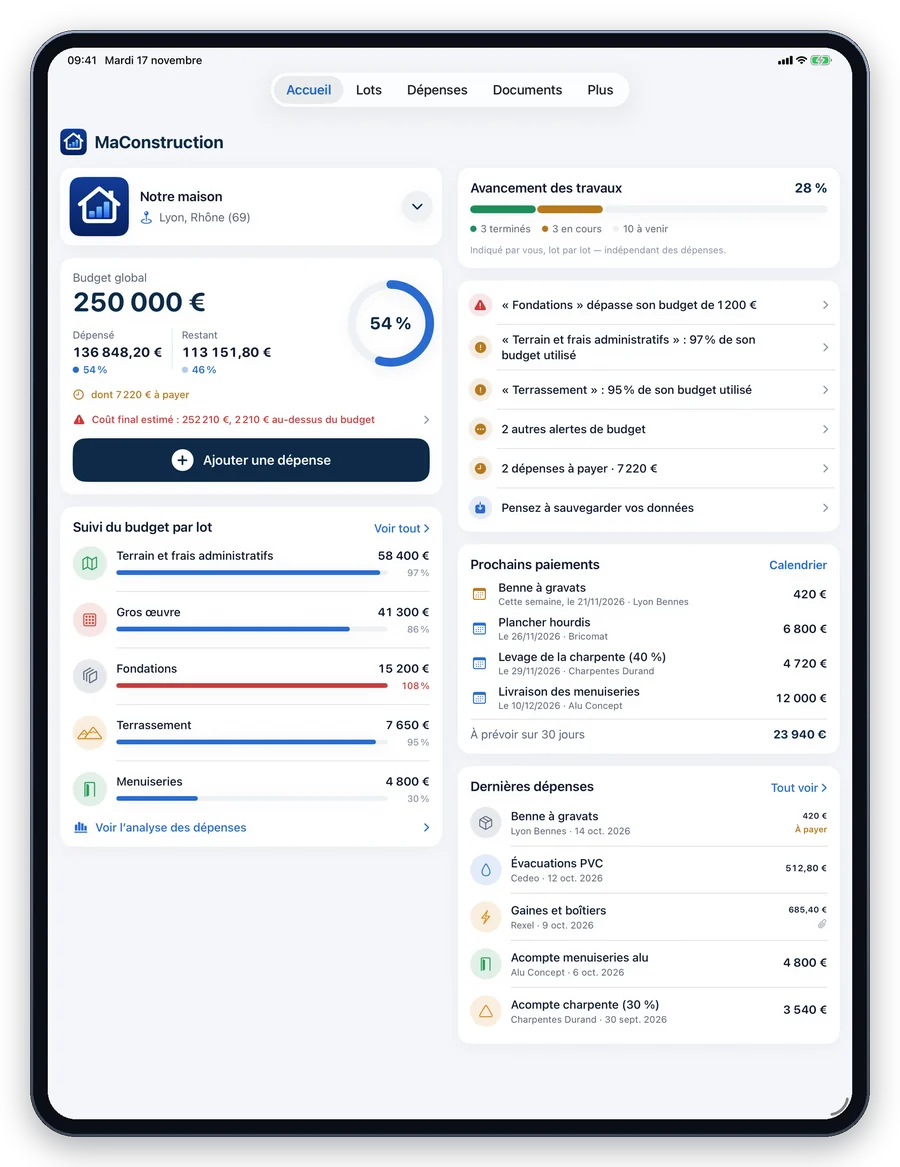
The estimated final cost adds up what you’ve already spent, what’s still to pay on your accepted quotes and the budgets of upcoming stages. You know in advance whether the budget will hold, and by how much it might be exceeded.
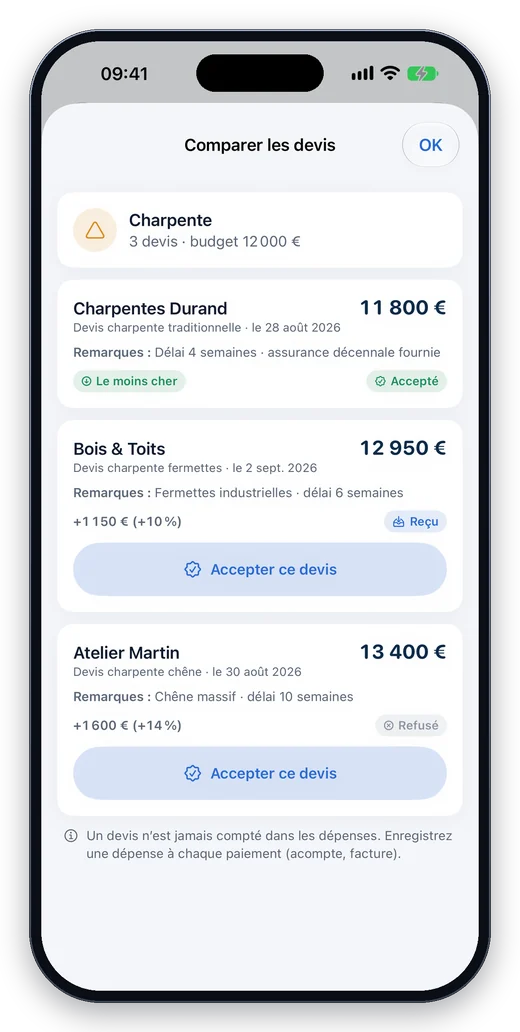
Compare your quotes easily
Price differences, cheapest quote, each contractor’s notes: make an informed choice and instantly see the effect on your budget.
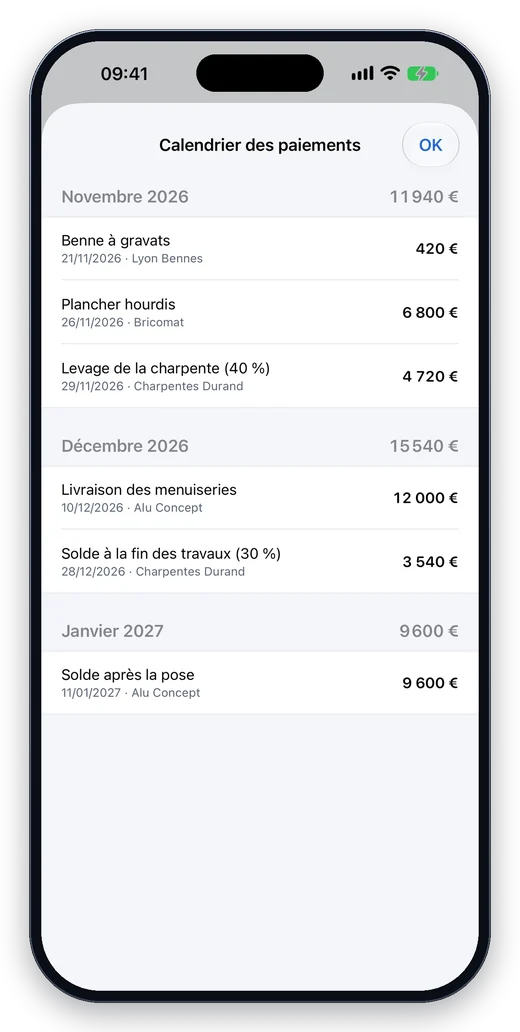
Never miss a payment again
A due date on every invoice to pay, and your upcoming payments on the home screen.
- With Plus: deposits, progress payments and final payments for each quote
- Payment calendar and reminders
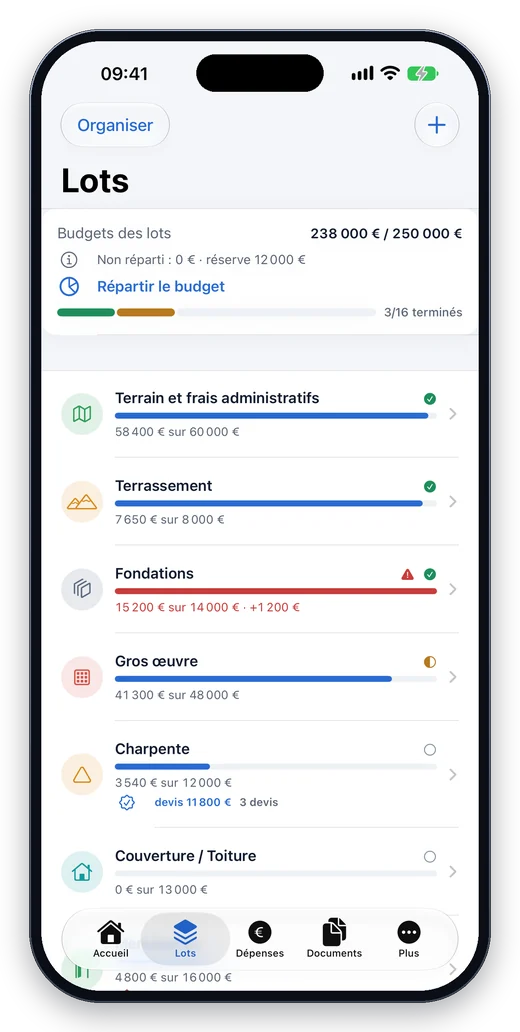
Organise your budget by stage
Structural work, roof framing, electrical, plumbing… Each stage has its own budget, and overruns stand out. An assistant helps you allocate your budget.
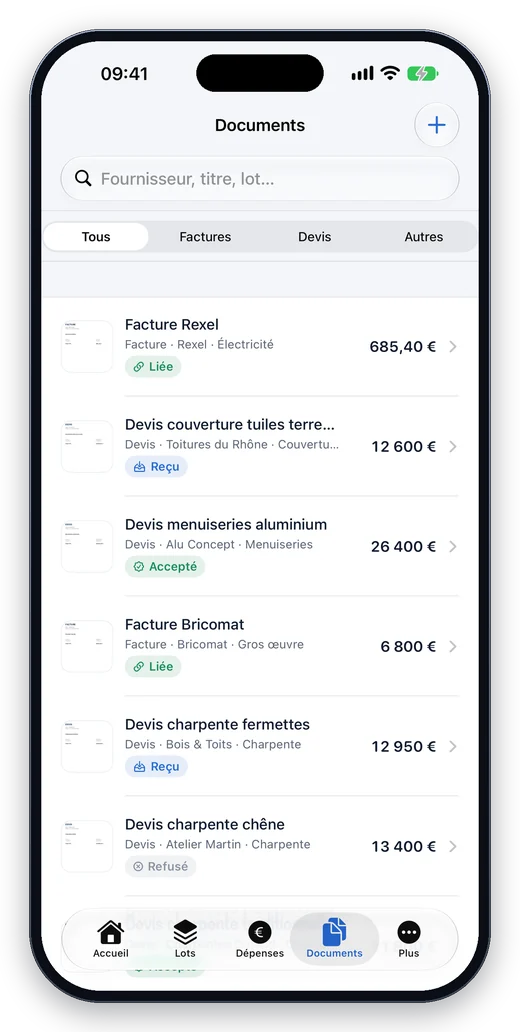
All your paperwork in one place
Invoices, quotes and photos, linked to your expenses and stages. With Plus: project PDF report, Excel export and export of all invoices, ready for your bank, your accountant or a refund claim.
Share with your partner
Manage your project together
Invite your partner with a simple QR code. You each enter things on your own phone, and everything syncs automatically, on iPhone and Android alike.
- No account or email needed
- End-to-end encrypted: no one else, not even us, can read your project
- Included in Plus; your partner joins for free
Your data
Your data stays yours
No sign-up
No account to create, no email address required.
On your phone
Your projects stay on your device and in your own iCloud or Google backup.
Encrypted for two
Sharing with your partner is end-to-end encrypted; the server can’t read anything.
No ads
No ads, no profiling, no reselling. Anonymous statistics only if you agree to them.
Also on iPad
A big screen to see your whole budget at once: two-column home screen, comfortable lists, in portrait or landscape.
Pricing
Start for free
The free version tracks one project with no time limit. Upgrade to Plus when you need it.
Free version
Free
To track one project, with no time limit.
- One project, with its stages and budget
- Expenses, invoices, quotes and photos
- Materials, labour, credit notes and returns
- Who does each stage
- Budget alerts and duplicate detection
- 5 automatic invoice readings
- Join your partner’s project
- Full backup
Costitecture Plus
Yearly or for life
Annual subscription, or a one-time lifetime purchase. Prices shown in the App Store and Google Play. Cancel the subscription at any time.
- Unlimited projects
- Unlimited automatic invoice reading
- Estimated final cost and quote comparison
- Shopping list and price comparison
- Savings from doing it yourself
- Detailed analysis and spending by supplier
- Payment schedules, calendar and reminders
- Share the project with your partner
- Contractors, insurance and warranties
- PDF report, Excel export and invoice export
Frequently asked questions
Where is my data stored?
On your phone, and in your own iCloud (iPhone, iPad) or Google (Android) backup. No account is needed.
My partner has an Android phone and I have an iPhone: will it work?
Yes. Sharing with your partner works between iPhone and Android. Your partner scans the invitation QR code with their camera; if they don’t have the app, they’re guided to the App Store or Google Play, then the project is added.
I’m doing some of the work myself: is the app right for me?
Yes. Record who does each stage, separate materials from labour, log your returns to the store and, with Plus, compare your purchase prices and your savings against contractors’ quotes.
Does invoice reading send my invoices anywhere?
No. Automatic reading happens on your phone. No invoice is sent to an outside service to be read.
How do I cancel the subscription?
iPhone: Settings › your name › Subscriptions. Android: Google Play › Payments & subscriptions › Subscriptions. The lifetime purchase has nothing to cancel.
Your project deserves a budget under control
Free, no sign-up, on iPhone, iPad and Android.